Sep 11, 2014
Magic Mega Menu Free with Pure CSS

Go Download Site: Here
Preview:

Aug 4, 2014
High Quality Seam Less Backgrounds for Websites (Pattern Type)

What's a Seamless Texture?
If the seamless texture were repeated four times, it would create a continuous pattern without it being obvious where one copy of the image began and another one ended
Aug 2, 2014
Customize your blogger Labels and Tags
.label-size{
margin:0;
padding:0;
position:relative;
}
.label-size a{
float:left;
height:24px;
line-height:24px;
position:relative;
font-size:12px;
margin-bottom: 9px;
margin-left:20px;
padding:0 10px 0 12px;
background:#0089e0;
color:#fff;
text-decoration:none;
-moz-border-radius-bottomright:4px;
-webkit-border-bottom-right-radius:4px;
border-bottom-right-radius:4px;
-moz-border-radius-topright:4px;
-webkit-border-top-right-radius:4px;
border-top-right-radius:4px;
}
.label-size a:before{
content:"";
float:left;
position:absolute;
top:0;
left:-12px;
width:0;
height:0;
border-color:transparent #0089e0 transparent transparent;
border-style:solid;
border-width:12px 12px 12px 0;
}
.label-size a:after{
content:"";
position:absolute;
top:10px;
left:0;
float:left;
width:4px;
height:4px;
-moz-border-radius:2px;
-webkit-border-radius:2px;
border-radius:2px;
background:#fff;
-moz-box-shadow:-1px -1px 2px #004977;
-webkit-box-shadow:-1px -1px 2px #004977;
box-shadow:-1px -1px 2px #004977;
}
.label-size a:hover{background:#555;}
.label-size a:hover:before{border-color:transparent #555
transparent transparent;

Pure CSS Menu with new Horizontal Style


Seattle Party Limo Rental | My New Website at USA-WA for my Friend

Jul 21, 2014
Build Full-featured sites with Bootstrap and GitHub

Here's a look at how to style your site with Bootstrap along with the tight integration available in GitHub, where you can host a Jekyll site for free.
Bootstrap joins the party
The basic interface created and presented by Jekyll is nice, but it can be greatly enhanced with one of the many freely available frameworks. I like Bootstrap, so I will use it to enhance my site presentation. The Jekyll-Bootstrap project makes this as easy as setting up Jekyll, so you can have a Bootstrap-themed site up in a relatively short time. It includes all necessary Bootstrap as well as Jekyll components, and there are some themes you can use or create your own.
The first step with taking advantage of the Jekyll-Bootstrap project is cloning its git repository. Once cloned locally, you may run it just like a basic Jekyll installation. The following commands show how this may be accomplished (just substitute your local directory information):
git clone https://github.com/plusjade/jekyll-bootstrap.git [local directory path] cd [local directory path] jekyll serve
In addition, you may use this site for the basis for your GitHub Pages site. You simply push the Jekyll-Bootstrap code to your GitHub repository as we did previously:
git remote set-url origin git@github.com:USERNAME/USERNAME.github.io.git git push origin master
This assumes an empty repository, so you may need to pull the site down first and then push changes -- there are a number of ways to accomplish it. If you prefer point-and-click instead of the command line, the GitHub GUI interface is a nice solution to working with your repositories.
While Jekyll is simple and straightforward to use, its template engine (Liquid) seems to have a bit of a learning curve. I mention it only because it is what the Jekyll-Bootstrap project uses to fully incorporate Bootstrap into Jekyll's ecosystem. A quick look at the directory structure after Jekyll-Bootstrap is installed shows a number of new directories and files. For example, there is a directory called _theme_packages as well as a themes directory under the assets directory. Once the site is generated (via Jekyll command), the themes directory is in the assets directory within the _site directory where the generated site file files are stored. You can learn more about directory structure and building custom themes online.
Thanks: Techrepublic
Feb 7, 2014
How to Change Google Chorme Text & Links Appearance
Change Google Chorme Text Appearance:
Here is trick to change the default Appearance for text styles of Google chorme browser.
Like: All Links, Visited links and mouse hover syles etc.
Go to Your Compter's Below Path:
And then open file: Custom.css and paste below {css} code in it and then save
 a {color: #0033FF! important;font-family: "Trebuchet MS";}
a:visited {color: #666666! important}
a:active {color: #339933! important}
a:hover {color: #009933! important; text-decoration: none;}
.rc .s {color: #666666! important;font-family: "Trebuchet MS";}
Note: This is only a example, you can modify css code as per need or your choice. (dSTAR: www.eguggu.com)
Result as Below:
Image is loading....

Feb 5, 2014
New Css Navigation Menu for Blogger, WordPress and Website
 New Css Menu (4 nos of Styles) for your website, Blogger and wordpress blog. Download and enjoy. Easy to install
Menu - Style - 1
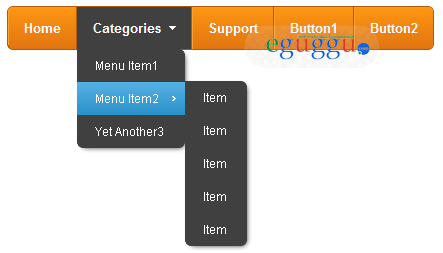
Download Menu files =>> Download
Menu - Style - 2
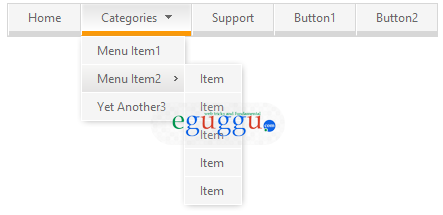
Download Menu files =>> Download
Menu - Style - 3

Download Menu files =>> Download
Menu - Style - 4
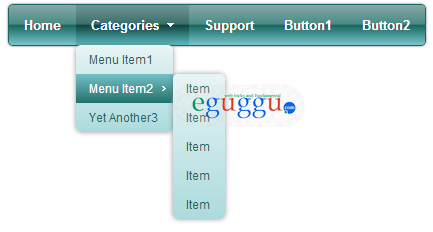
Download Menu files =>> Download